Microsoft Word(DOCX)エクスポートと自動改行付きSRT

Try Otter today
300 monthly transcription minutes
30 minutes per conversation
3 audio or video file imports

Try Otter for enterprise today
Industry leading transcription
Advanced AI Chat
Custom integrations & workflows

Intelligent, voice-activated, meeting agents that directly participate in meetings answering questions and completing tasks - to make capturing, understanding, and acting on conversations effortless. Learn more about what’s new here.

Otter Pro と Otter for Business の新機能を追加しました。Microsoft Word (DOCX) と SRT の自動改行機能により、Otter からのエクスポートがより簡単になりました。
Microsoft Word(DOCX)エクスポート
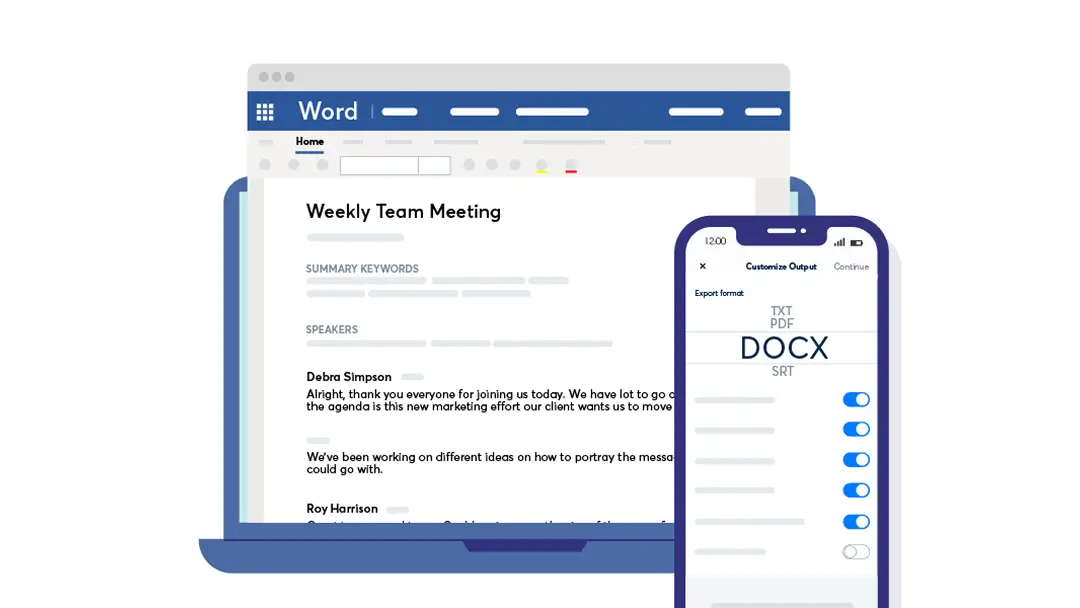
書き起こした会話文をハイライトや写真を含むDOCX形式でエクスポートできます

3ドットメニューで、[Export] > [Export text]に移動し、[Export fomat selector]で[DOCX]を選択します。必要に応じて他の設定を調整して、重要なものをエクスポートします

自動改行付きSRT
[Export format selector]でSRTを選択すると、自動改行を有効にするための追加オプションが表示されます

300 monthly transcription minutes
30 minutes per conversation
3 audio or video file imports

Industry leading transcription
Advanced AI Chat
Custom integrations & workflows

Related posts

Convert SRT to Word: Microsoft Word (DOCX) Export and Automatic Line Breaks
Learn how to export transcripts from Otter.ai as Microsoft Word documents and SRT files with automatic line breaks to boost your workflow efficiency even more.
min

Creating captions & subtitles for videos using Otter
A how-to guide for using Otter for subtitles editing and creating captions for videos.
min

How to Transcribe a Video: Fast and Easy Methods for Any File Type
Learn how to transcribe a video quickly using tools like Otter, and explore features to consider when choosing a video-to-text converter.
min

Otter® Chrome Extension: Use Otter AI for Your Virtual Meetings
Add Otter to virtual meetings with the Chrome Extension. Otter Meeting Agent records, participates, takes notes, captures slides & generates AI summaries.
min

How to Convert WAV to Text: Best WAV Transcription Methods
Learn effective methods to convert WAV files to text for free using top transcription tools and why WAV's quality provides accurate transcriptions.
min

Transcribe Audio to Text in 2023
Transcribing audio to text can be a useful tool for a variety of purposes. It can help with creating subtitles for videos, transcribing interviews for research, or even just making it easier to read through notes from a meeting. There are several different ways to transcribe audio to text, ranging from manual transcription to using automatic transcription software.
min

How To Generate a YouTube Transcript: A Complete Guide
Learn how to generate a YouTube transcript for more accessible videos, both on the platform and with AI-powered tools like Otter.
min

How To Get a Transcript of a Podcast: A Step-By-Step Guide
Discover how to get a transcript of a podcast using Otter. In addition, learn how transcripts benefit both podcast creators and listeners.
min

How to Use AI to Summarize Transcripts
Learn how Otter boosts your productivity by providing summarized transcriptions of your meetings, lectures, favorite podcasts, and more.
min

Featured Student - Justin Felder
Otter isn’t just for two- or four-year college students. Because of its accuracy and convenience, the app is versatile enough to be used for all...
min

Otter.ai Breaks $100M ARR Barrier and Transforms Business Meetings Launching Industry-First AI Meeting Agent Suite
Otter.ai, the leading AI meeting productivity platform, today announced it has surpassed $100 million in annual recurring revenue (ARR). Building on this momentum and accelerated growth, Otter is unveiling a groundbreaking evolution in AI-powered collaboration, launching a first-of-its-kind suite of voice AI meeting agents designed to supercharge business meetings.
min

Otter.ai Integrates with Dropbox to Collaborate, Manage, and Search Video and Audio Files
Otter Voice Meeting Notes Streamlines Workflow, Saves Time, and Reduces Cost for Customers in Advertising, Broadcasting, Publishing...
min

Mastering the Art of the Meeting Recap: An Essential Guide
Write effective meeting recaps to keep your team aligned and productive. Discover tips, examples, and templates to capture key points and action items.
min

Otter's New Languages: French and Spanish! 🇫🇷 🇪🇸
Otter is now expanding its language transcription to include French and Spanish! Whether you're capturing, transcribing, or summarizing meetings, you can do it all in these languages with the same unmatched accuracy and efficiency you've come to love from Otter. Get ready to break language barriers and boost productivity like never before!
min

6 Tips to Make Meetings more Accessible in 2023
Corporate meetings are an essential part of business operations, but they can often be exclusionary for employees with disabilities. By making meetings more accessible, businesses can create a more inclusive and supportive work environment for all employees. Here are some tips for making corporate meetings more accessible.
min